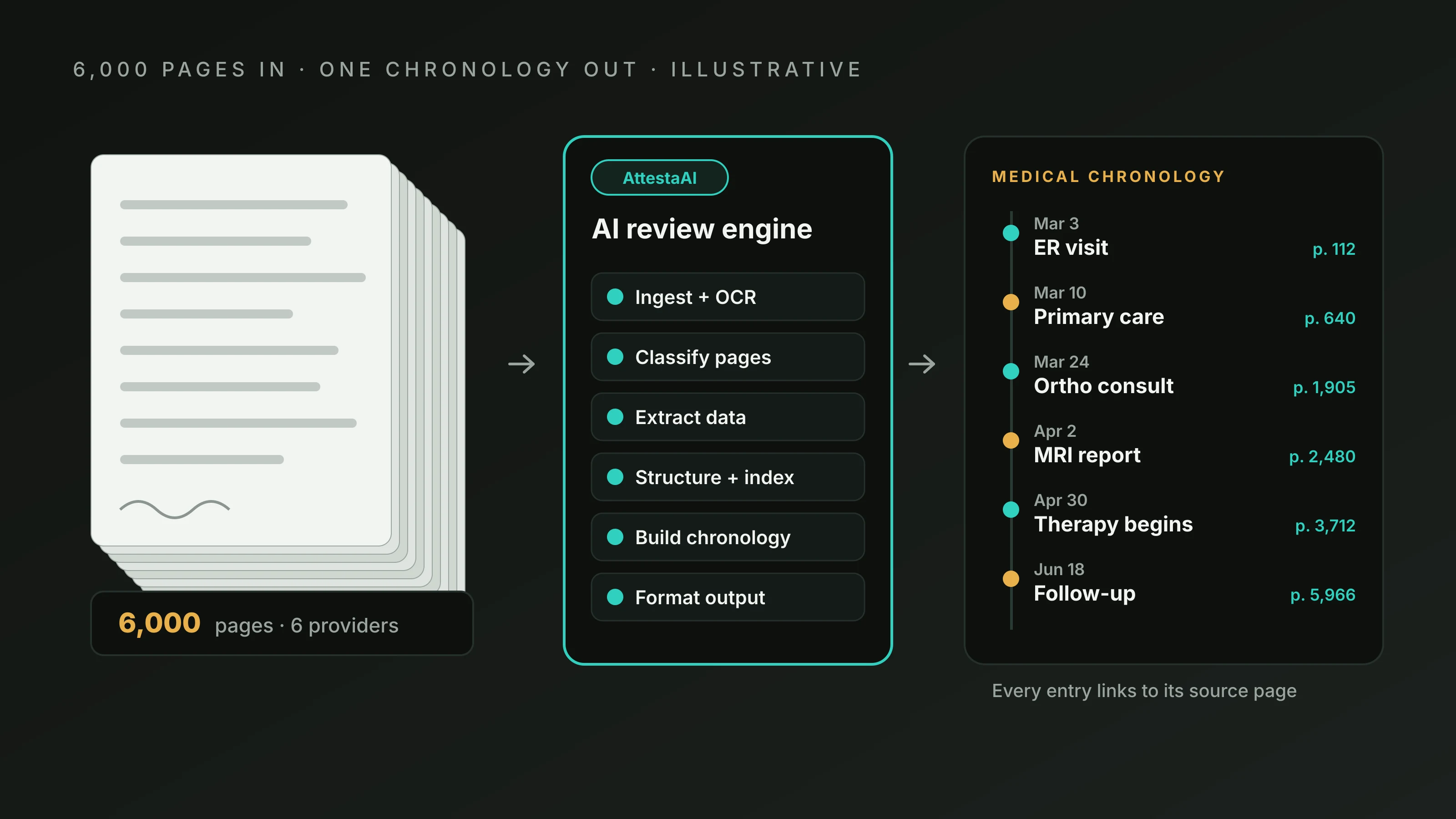

Ask a paralegal what slows down a medical file review, and you will often hear the same answer: finding things. The records exist, but they sit inside a 5,000-page PDF made of scanned images. There is no way to search for a surgeon’s name, a medication, or a date of service, so someone scrolls.
AI medical record indexing is meant to fix that. It uses optical character recognition (OCR) to turn page images into machine-readable text, then applies AI to classify documents, extract details such as dates, providers, and diagnoses, and assemble an index that lets a reader jump to what they need. The goal is searchable medical records instead of a wall of pictures.
This article walks through the problem and the technology step by step, then covers how to judge an AI-generated index, what to look for in medical document indexing software, and where the MedicalLegalSpider.com (MLS) 100% AI Review service fits. It is written for attorneys, paralegals, legal nurse consultants, and claims professionals who want a realistic picture rather than a sales pitch.
Why Scanned Medical Records Resist Search, and What OCR Changes

The Problem With a Stack of Page Images
Many medical records reach law firms as scans or faxes. To a computer, a scanned page is a picture, not text. You can see “Dr. Patel, orthopedic surgery” on screen, but the file contains no characters to search. Pressing Ctrl+F finds nothing.
Several features of medical productions make this worse:
- Mixed sources. Hospitals, clinics, imaging centers, and pharmacies each format records differently.
- No standard order. Pages from different visits are often interleaved.
- Repeated content. The same discharge summary may appear in three productions.
- Variable quality. A crisp portal download may sit next to a skewed, faded fax.
The result is a file that is complete on paper but hard to use.
OCR in Plain Terms
OCR software analyzes the shapes on a page image and converts them into text characters. When it works well, a scanned page becomes a document whose words can be searched, copied, and processed by other software. That text layer is the foundation for nearly everything else in medical document processing. Without it, classification and extraction have nothing to read.
Where OCR Stumbles
OCR is useful, but it is not perfect, and its weaknesses carry into every later step. Common trouble spots include:
- Poor scan quality: low resolution, skewed pages, shadows, or fax noise
- Handwriting: cursive and rushed notes are much harder than typed text
- Stamps, highlights, and marginal notes that overlap printed text
- Tables and forms, where reading order can be scrambled
- Small print and unusual fonts, such as those on older records
- Medical shorthand, where a misread character can change an abbreviation’s meaning If a recognized word is wrong, a search for that word will fail even though the page contains it. That is the first limit to understand about searchable medical records built from scans: searchable does not mean flawless.
From Raw Text to a Usable Index: What AI Medical Record Indexing Does

Once pages have a text layer, AI can start organizing them. Think of it as four jobs performed in sequence:
Job 1: Classifying Each Document
Document classification sorts pages into types, such as physician progress notes, operative reports, imaging reports, laboratory results, therapy notes, discharge summaries, and billing statements.
It also helps draw boundaries, since a 200-page upload is really dozens of separate documents that need to be recognized as such.
Job 2: Extracting Key Details
Automated data extraction looks for the details a legal team usually needs first:
- Dates of service and dates of injury
- Healthcare providers and facilities
- Diagnoses and symptoms
- Medications and dosages
- Procedures, tests, and imaging
- Treatment events such as referrals and follow-ups
Job 3: Assembling the Index
With types, dates, and providers identified, automated medical record organization can arrange entries in a navigable structure: by date, by provider, by document type, or some combination. Each index entry points to the source pages so a reader can verify the original.
Job 4: Making the Whole File Searchable and Navigable
The final layer is usability. Depending on the software, that can include full-text search, filters by provider or date, bookmarks, and links from index entries to source pages. Some systems also support question-and-answer features that retrieve information from the records. What a given product offers varies, so it helps to separate general technology capabilities from the specific features a vendor has confirmed.
A Walkthrough: Four Thousand Scanned Pages, One Question
Imagine a defense firm receiving a 4,000-page production for a claimant alleging a shoulder injury. The file is one large scanned PDF, with records from a hospital, a family physician, two orthopedic practices, and a physical therapy clinic. The attorney’s question is simple: Did the claimant mention shoulder pain to anyone before the incident date?
Before indexing. A paralegal would need to page through the file hoping to spot early mentions, or read the primary care records line by line.
After AI-led processing. OCR creates a text layer. The software classifies the documents, identifies the family physician’s visits, extracts the dates, and builds an index sorted by date. The paralegal filters to visits before the incident date, searches for “shoulder,” and lands on two entries. Each one links to the page where the complaint is recorded.
What still needs checking. One older visit was a faint fax, and OCR misread a word. The paralegal opens the source page to confirm what the note says. Another entry mentions “shoulder” only in a list of ruled-out symptoms, which matters for how it is used.
The takeaway is not that software answered the legal question. It shortened the path to the relevant pages, and a person still had to read, confirm, and interpret them. That is the realistic promise of AI medical record indexing.
How to Tell Whether an AI-Generated Index Is Complete and Useful
AI-generated output is not automatically verified by a person, so evaluation matters. A practical audit does not require rereading the file:
| Check | What to do | What it reveals |
|---|---|---|
| Page coverage | Confirm that every page number is accounted for | Skipped or unrecognized pages |
| Spot-check dates | Open 10–20 random entries and compare dates with source | Date extraction accuracy |
| Provider consistency | Look for one provider appearing under several spellings | Fragmented or duplicated entries |
| Known-fact test | Search for a fact you already know is in the file | Whether search and indexing work for your records |
| Poor-scan sample | Check entries from worst scans or handwritten notes | Where OCR and extraction are weakest |
| Gap check | Compare listed providers with those you expect | Missing records or missed documents |
If these checks turn up problems, decide how much additional review the file needs before anyone relies on the output. High-stakes facts — those that will appear in a demand letter or deposition outline — deserve confirmation against source pages regardless of which method produced the index.
Problems That Commonly Affect AI Indexing
Beyond OCR, a few other issues deserve attention:
- Duplicate pages, which can inflate counts or create conflicting entries
- Extraction errors, such as a visit date confused with a print date or fax header date
- Ambiguous terminology, where abbreviations vary across specialties
- Misattributed documents, such as another patient’s page mixed into the file
- Unclear document boundaries, especially where a long file contains many short records
None of these makes AI indexing unusable. They are reasons to treat the index as a working tool and to check the parts that matter most.
Putting AI Indexing to Work: Software Selection and the MLS 100% AI Review Model

What to Ask When Evaluating Medical Document Indexing Software
Whether you consider a standalone tool or a service built around one, these questions separate substance from marketing:
- Input handling. How does it treat scanned, faxed, and handwritten pages, and how does it flag low-confidence text?
- Outputs. Does it produce an index, chronology, summary, or searchable file, and in what formats?
- Traceability. Can every entry be traced to its source page?
- Customization. Can the layout, terminology, and level of detail be matched to your firm’s preferences?
- Volume. How does it handle very large files, and are there limits?
- Review level. Is the output AI-only, or does a person check it? Make sure the answer fits how you plan to use the results.
- Confidentiality. How are records transmitted, stored, accessed, and deleted? Ask for specifics and for the documentation that supports them, rather than relying on general statements.
- Fit for the task. Is the tool appropriate for early assessment or screening, or for facts you will rely on in litigation?
Where MLS 100% AI Review and AttestaAI Fit
MedicalLegalSpider.com (Medical Legal Spider, or MLS) offers its 100% AI Review solution, which uses AttestaAI, a purpose-built AI agent described on the MLS website as reading each page of a case and producing a chronology, a summary, and plain-English case Q&A. The site lists narrative, tabular, hybrid, and issue-focused templates, and states that the service scales from 500 to 20,000 or more pages.
Several capabilities described on the site map directly to the workflow in this article:
- Structuring and smart indexing, which the site describes as organizing typed or handwritten pages into a logical, searchable structure
- Smart linked navigation, described as hyperlinked chronologies that let readers jump from an index entry to the source page
- Extraction of items such as diagnoses, dates, and providers, along with missing-record discovery that flags apparent gaps
For a plain-language view of the stages, the MLS how it works page outlines an upload, read, structure, verify, and deliver sequence. If the “verify” stage matters to your use case, ask MLS directly what verification applies to a 100% AI Review file, so your expectations match the deliverable.
MLS positions this model for early case assessment, intake screening, and high-volume claims review. Those uses fit the general principle in this article: AI-led processing is well suited to getting a large file organized quickly, while the weight you place on any individual fact should match the stakes.
As with any provider, AI output does not replace legal judgment, and it does not substitute for professional medical interpretation.
Frequently Asked Questions
Can OCR make a scanned medical record searchable?
Yes, in most cases. OCR converts page images into text that software can search. The quality of the result depends on scan clarity, handwriting, and layout. Poor scans and handwritten notes may be read incorrectly or partially, so important entries should be confirmed against the original page.
How does AI know what type of document it is looking at?
AI models are trained to recognize patterns, such as headings, layouts, and the language used in different record types. A discharge summary, lab report, and operative note each have characteristic features. Classification is not always right, especially for unusual or mixed documents, which is why spot-checking is worthwhile.
Is an AI-generated medical index the same as a human-verified one?
No. An AI-generated index is produced by software and is not automatically checked by a person. Whether any human review is added depends on the service model. Ask your provider what verification, if any, applies, and decide how much checking you need based on how the output will be used.
What can go wrong when AI extracts dates and providers from medical records?
Common errors include confusing a fax date or print date with the date of service, misreading a handwritten name, splitting one provider into several entries, or attaching a page to the wrong document. These problems are most likely on low-quality scans, so test the tool on your own files.
How can attorneys check whether searchable medical records are complete?
Confirm that every page is accounted for in the index, compare a sample of entries with the source pages, search for facts you already know are in the file, and look for providers or visits you expect but do not see. Pay particular attention to poor-quality scans and handwritten pages.
Conclusion: Searchable Does Not Mean Settled
AI medical record indexing changes the first hour of a file review. Instead of scrolling through images, a legal team can search, filter, and jump to the pages that matter. That is a real improvement for large, multi-provider files, and it explains why automated medical record organization is attracting attention from law firms and claims units.
The practical takeaway is to treat the index as a fast map, not a final authority. Check its coverage, test it against facts you already know, and give extra attention to poor scans, handwriting, and any entry you plan to cite.
If you are weighing an AI-led approach, you can explore the MedicalLegalSpider.com 100% AI Review service and see how its outputs look on your own material. The MLS site currently describes a 500-page free trial and sample deliverables, and you can get started there. Confirm the current terms with MLS before you rely on them.